


You can increase the revenue if you know how to properly manage the placement of Adsense Ads. But, if Ads doesn't appear in right place, huge traffic may not give you any revenue. This post is about adding adsense ad above/ below the post You need to do a little bit of HTML work . But, don't worry I'll give you the code. You just need to paste it in right place.
STEP 1 : ( To place the Ad below the Post )
(NOTE)
STEP 1 : ( To place the Ad below the Post )
- Sign in to your google Adsense account .
- Click on "My Ads" - ( Click on Classic View if you cannot see My Ads)
- Click on " Get Code" .
- Copy the code.
(NOTE)
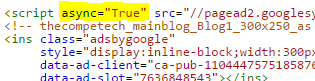
If if it is Asynchronous Code then don't forget to add ="true" after async . For example :

<b:if cond='data:blog.pageType == "item"'>
< Paste the Code here >
</b:if>
( To Place the Ad above the Post )
To post the Adsense Ad above the Post you just need to Paste the red code above to this blue one <b:include data='post' name='post'/>
<b:if cond='data:blog.pageType == "item">
< Paste the Code here >
</b:if>
<b:include data='post' name='post'/>
STEP 2 :
- Go to Templates of your Blogger.
- Click on "Edit HTML"
- Find the following code : (Using CTRL + F )
- If you do not find the code above Search for this one :
<data:post.body/>
Now paste the following red code below above Blue Code code and paste the adsense code in between:
< Paste the Code here >
</b:if>
( To Place the Ad above the Post )
To post the Adsense Ad above the Post you just need to Paste the red code above to this blue one <b:include data='post' name='post'/>
<b:if cond='data:blog.pageType == "item">
< Paste the Code here >
</b:if>
<b:include data='post' name='post'/>
You can comment if you need any further help with blogger .




 can start blogging and share your ideas among people. You must pay to concerned to get the blog with the registered domain name . However, the sites or blogs provider like
 If you're interested then start it, slowly you will know each and everything about it .


